- Setting Assessment Expiry:
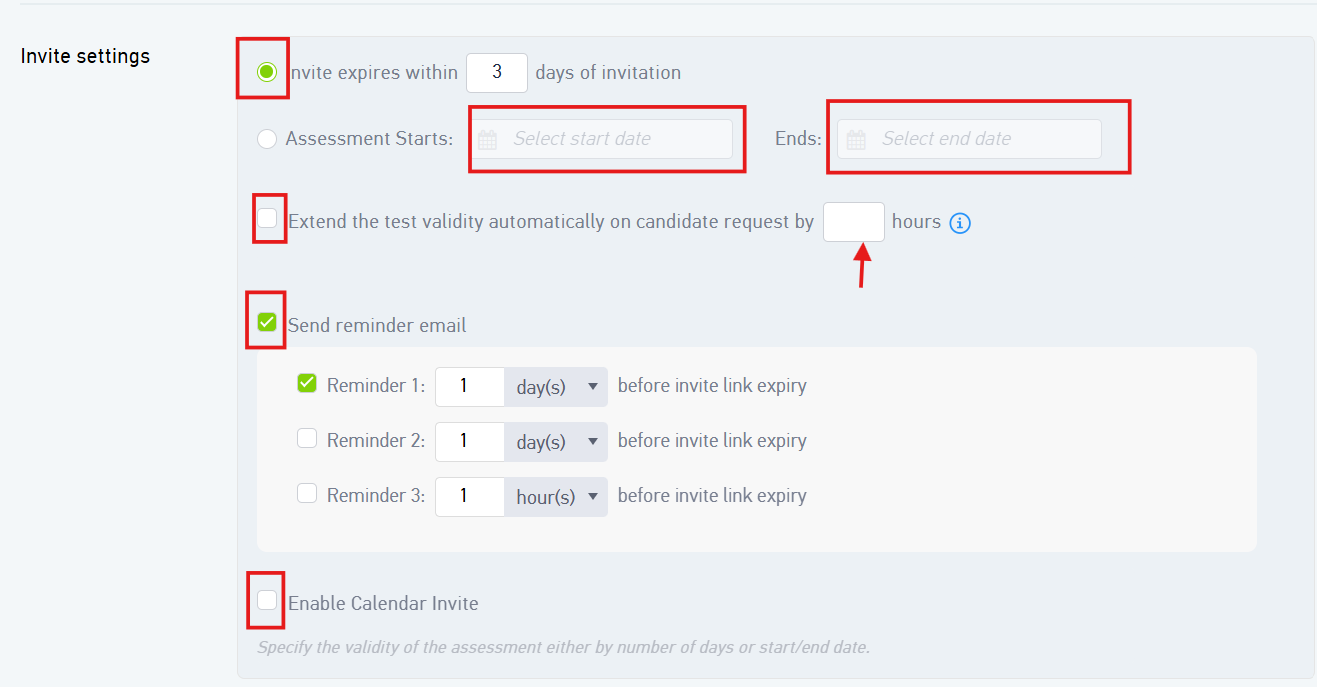
- You can define the assessment’s expiry by specifying the number of days it should remain active.
- Alternatively, you may set a specific start date and/or end date to control the assessment availability period.
- Extending Assessment Validity:
- In cases where a candidate is unable to complete the assessment within the given timeframe and requests an extension, you can easily accommodate this by using the Extend Test Validity option.
- Simply enter the number of additional days, and the system will automatically extend the assessment deadline for that candidate.
- Sending Reminder Emails:
- To ensure candidates complete their assessments on time, you can configure automated reminder emails, such as sending a notification one day before the assessment expires.
- You can configure multiple reminders as shown in an above image
- Enabling Calendar Invites:
- You also have the option to send a calendar invite to candidates by enabling the relevant setting.
- This helps candidates stay informed and prepared for the assessment deadline.
Was this article helpful?
That’s Great!
Thank you for your feedback
Sorry! We couldn't be helpful
Thank you for your feedback
Feedback sent
We appreciate your effort and will try to fix the article