Live Interviews – Proctoring Settings
These settings help ensure the authenticity and fairness of live interviews by enabling various monitoring and verification features:
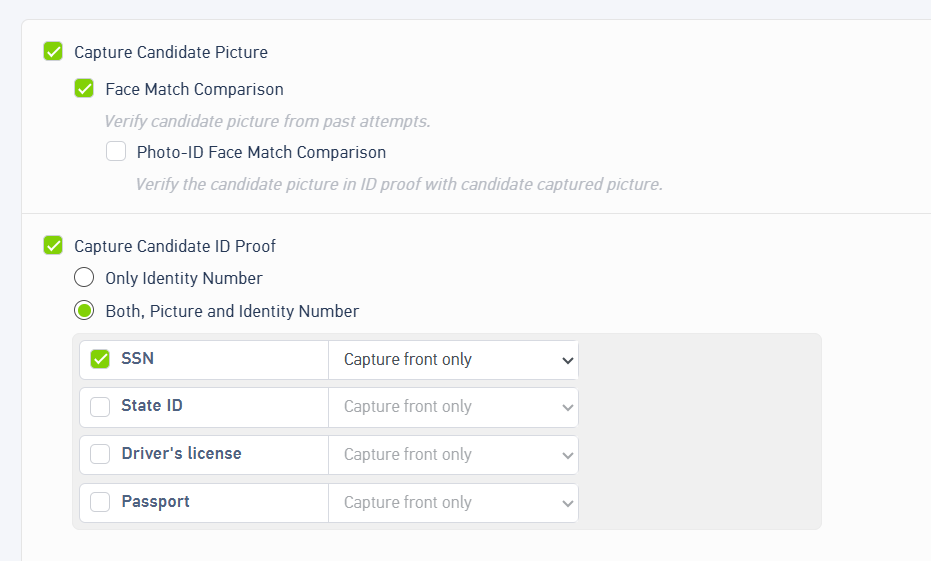
1. Capture Candidate Picture
- Before starting the live interview, the candidate will be required to capture their profile picture.
- This image is used for identity verification throughout the session.
- Face Match comparison : This verifies if there's any past attempts of the candidate, if yes, it gets highlighted in the report.
- Photo Id match match Comparison : The Photo ID Match Comparison feature validates the authenticity of the candidate’s identity by comparing the photograph on the submitted government-issued ID with the live image captured during the assessment or interview process.
2. Capture Candidate’s Identity Proof
- You can enable this feature if you want to collect the candidate's official identity proof before the interview begins.
- Once enabled, you can select the type of ID document (e.g., Aadhar, Passport, Driving License) the candidate needs to submit.
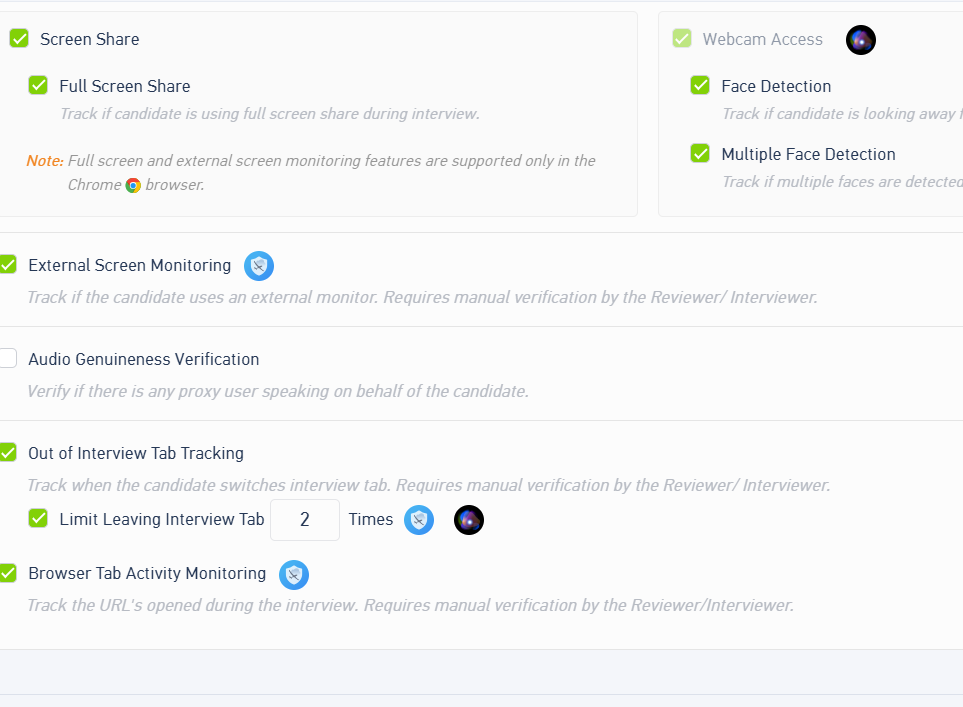
3. Audio Genuineness Verification
- This feature helps detect if someone else is speaking on behalf of the actual candidate during the interview.
- The system performs checks to ensure if the speaker is genuine.
4. Face Detection : It detects if your face is going out of the focus area.
5. Multiple Face detection : This tracks if there are multiple faces detected while the candidate is appearing for the Interview.
6. Out-of-Interview Tab Tracking
- If the candidate navigates away from the interview browser tab, a notification is triggered.
- Manual review is required to investigate such behavior.
- Limit leaving interview tab : If the candidates leaves the interview more than "n" number of times, an interview will be automatically terminated for the candidate.
7. External screen monitoring
- Detects if the candidate is using a secondary screen or monitor during the interview.
- Helps prevent cheating through external devices.
8. Browser Tab Activity Tracking
- Monitors and detects if the candidate switches tabs or accesses other websites/browsers during the session.
- Helps ensure the candidate remains focused on the interview window.
9. Face Match Comparison
- Compares the candidate’s current image with images from any previous interview attempts.
- This helps prevent impersonation or multiple attempts under different profiles.
10. Photo ID Match Comparison
- This feature compares the candidate’s captured photo with the photo present on the submitted ID proof.
- Ensures that the person appearing for the interview is the same as the one on the official ID.
Was this article helpful?
That’s Great!
Thank you for your feedback
Sorry! We couldn't be helpful
Thank you for your feedback
Feedback sent
We appreciate your effort and will try to fix the article